Real Halo reports
One report per tile, in a report folder named after the dashboard. They're yours to keep, edit and share.
How it works
Describe the dashboard you want. EL's crew writes and tests every report, then you publish it to Halo.


Step 1
Say who it's for and what they need to see, in your own words. Or start from an idea. EL's crew plans a dashboard of tiles, usually in under a minute.
A service desk dashboard for team leads, with open tickets by agent, SLA breaches this week and ticket volume by priority.
SLA performance
Breaches, at-risk tickets and on-time rate by team.
Agent workload
Open tickets, handle time and utilisation per agent.
Assets and contracts
Assets by type and contracts due for renewal.
Monthly exec summary
Volume trend, CSAT, top request types, headline KPIs.
Step 2
Move tiles by their grip, take out what you don't need and add what's missing. Try it on this dashboard.
Step 3
Publish, and the reports and the dashboard are created in your Halo instance. Open it there like any other dashboard.
 Service desk
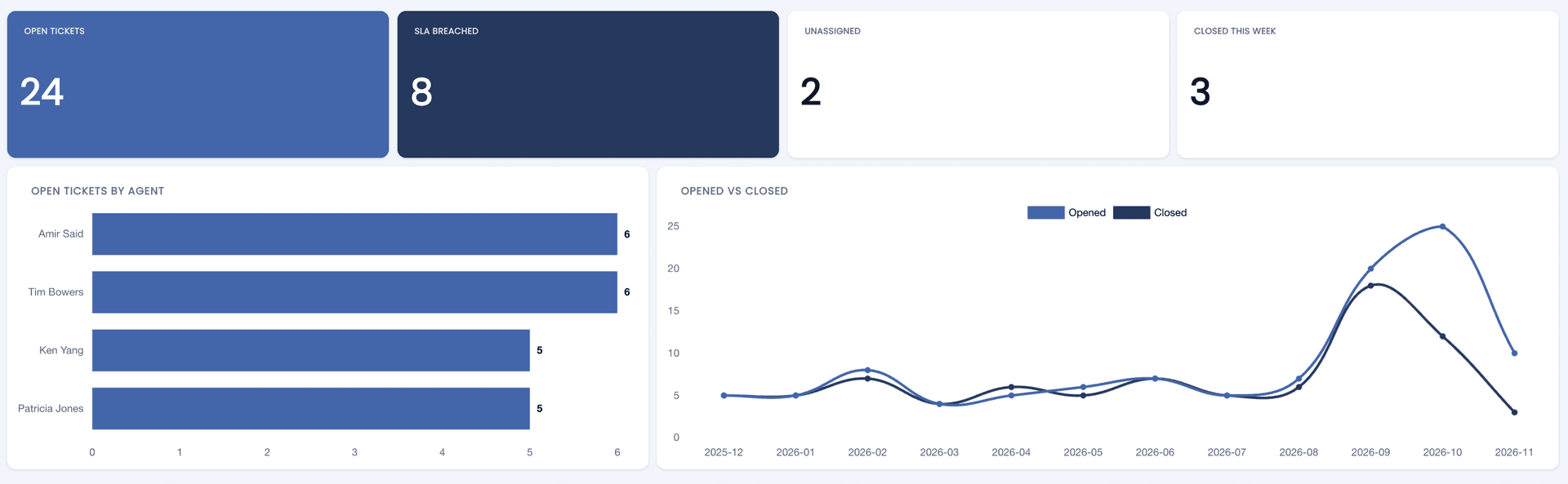
One report per tile, in a report folder named after the dashboard. They're yours to keep, edit and share.
Every report brings back the record first, such as the Ticket ID or Invoice ID. Click a number and the tickets behind it open.
Edit a tile or the layout, publish again, and Halo updates in place. The link stays the same.
Before you start
To write the SQL and publish, yes. You can describe and plan a dashboard without it. How to connect Halo
A report for each tile, in a folder named after the dashboard, and the dashboard that shows them. Nothing is created until you publish. Publishing, step by step
Not always, and we won't pretend otherwise. Every query is tested on your Halo data before it's used, and related numbers are checked to count the same tickets and invoices. Check a new dashboard before you rely on it.
Yes. Rewrite what the tile should show, ask the AI to fix it, or edit the SQL yourself. Each change is tested before it replaces the old one.
Planning and writing SQL use tokens from your monthly plan, and the dashboard shows what it has used so far. See pricing
Pick None for Halo's own style, or Elegant for white cards, a title band and your colour on every chart.